

How do I Log in Using 2-Step Verification?
Updated about 4 years ago
What is 2-Step Verification?
2-Step Verification is an industry standard way of verifying that it is actually you who is logging into your account. This security feature requires you to input a 6-digit code, in addition to your email address and password, when logging in to EzLicence.
By adding 2-Step Verification, the personal information held in your EzLicence account now has an extra layer of protection and security, should your login and password be compromised in any way.
How to Log in Using 2-Step Verification
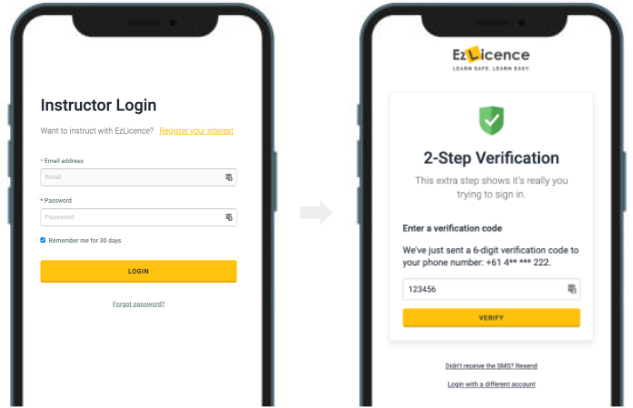
- When you log in to your account, enter your email and account password as per usual.
- Be sure to tick the box that says 'Remember me for 30 days'. This will keep you logged in for 30 days.
- Once you click 'Login', you will receive an SMS to your mobile phone with a 6-digit code.
- Enter this code into the login screen. The code remains valid for 5 mins.
- If you do not receive the code within 60 seconds please click 'Resend' and enter the new code.
- Click 'Verify' and you'll gain access to your EzLicence account.
Still need help?
If you are unsure of how it works or need help accessing your account, please contact our team.